
You can restart VPS via the command line or SolusVM.
How to Reboot/Restart a VPS via SolusVM?
1. Log in to your SolusVM Control Panel.
2. If you have multiple VPSs, select the appropriate one.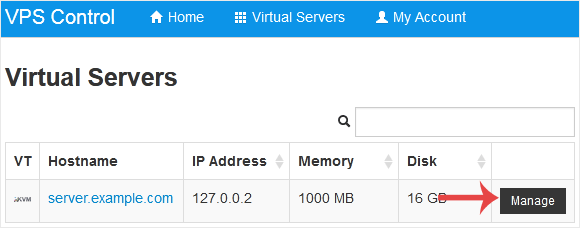
3. Click on Reboot.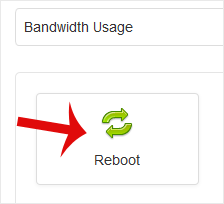
4. Choose Yes to confirm.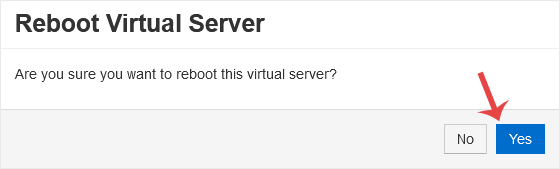
It may take some time to reboot. Then, it will display the message.
How to Reboot/Restart a VPS via Command Line?
1. Log in to your SSH Client.
2. Enter the command shutdown -r now.
Once you execute the command, it may take some time for the VPS to reboot. If the VPS does not come online after 5 to 10 minutes, we advise you to reboot it from SolusVM.
- Home
-
Store
- Browse All
- PROFESSIONAL HOSTING
- Linux VPS
- Windows VPS
- Cloud Storage
- S3 Object Storage
- Server Cloud Linux
- Server Cloud Windows
- Cloud Computer's
- GMail G Suite
- Office 365
- Skype
- Azure
- SharePoint
- OneDrive
- Visio Online
- Exchange Online
- Google ADS & Facebook ADS
- Rack System assistance
- Web System assistance
- SSL Certificates
- XOVI NOW
- VPN
- Register a New Domain
- Transfer Domains to Us
- Announcements
- Knowledgebase
- Network Status
- Contact Us
- Whois
-
More