
If you want to delete an FTP account, you can accomplish it by following this tutorial.
1. Log in to your cPanel account.
2. In the Files section, click on FTP Accounts.

3. Under the FTP Accounts list, choose Delete.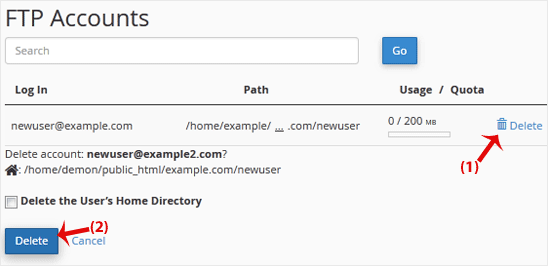
4. Click on Delete once again to confirm and remove the FTP account.
Warning: Do not use the Delete the Users Home Directory option. Otherwise, the data inside your FTP user account will also be deleted and will become unrecoverable unless you restore it with a backup.
- Home
-
Store
- Browse All
- PROFESSIONAL HOSTING
- Linux VPS
- Windows VPS
- Cloud Storage
- S3 Object Storage
- Server Cloud Linux
- Server Cloud Windows
- Cloud Computer's
- GMail G Suite
- Office 365
- Skype
- Azure
- SharePoint
- OneDrive
- Visio Online
- Exchange Online
- Google ADS & Facebook ADS
- Rack System assistance
- Web System assistance
- SSL Certificates
- XOVI NOW
- VPN
- Register a New Domain
- Transfer Domains to Us
- Announcements
- Knowledgebase
- Network Status
- Contact Us
- Whois
-
More